Overview
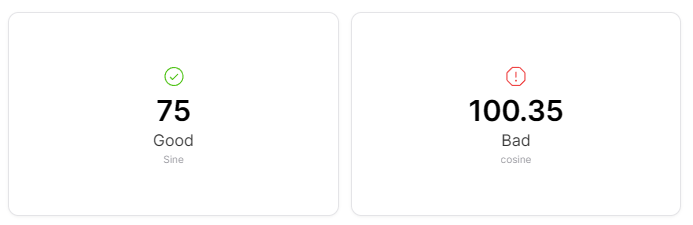
The Status widget shows status information with color-coded indicators. It provides visual feedback on the operational state or health of devices, making it easy to identify issues at a glance.
Use Cases
- Device Health - Monitor overall device operational status
- Connection Status - Show connectivity states
- Operational Modes - Display current operation mode
- Alert Status - Indicate active alerts or warnings
- System Health - Overall system status monitoring
Key Features
- Color-coded status indicators
- Icon support for quick recognition
- Text status labels
- Multi-state support
- Real-time status updates
Configuration
Basic Settings
| Field | Required | Description |
|---|
| Name | ❌ No | Display name for the widget |
| Thing | ✅ Yes | Select Thing to monitor |
| Measure | ✅ Yes | Choose measure for status (with id, measure, thingId) |
Status Condition Mappings
Each status condition requires the following fields:
| Field | Required | Description |
|---|
| Name | ✅ Yes | Status name/label |
| Condition | ✅ Yes | Condition type: 'Range' or 'Value' |
| Icon | ✅ Yes | Icon to display ('error', 'warning', 'check') |
| Color | ✅ Yes | Color for the status indicator |
| Display Text | ❌ No | Additional text to display with the status |
| Data | ✅ Yes | Value or range (from/to) for condition matching |
Display Options
| Field | Required | Description | Default Value |
|---|
| Transparent | ❌ No | Remove widget background | false |
| Border color | ❌ No | Widget border color | - |
| Background Color | ❌ No | Widget background color | - |
Best Practices
- Clear States - Define distinct status states
- Color Consistency - Use standard colors (green=good, red=bad yellow=warning)
- Dashboard Overview - Use in dashboard headers for overall status
- Multiple Devices - Compare status across devices
- Alert Integration - Link with notification systems
What's Next?