Property List Widget
Overview
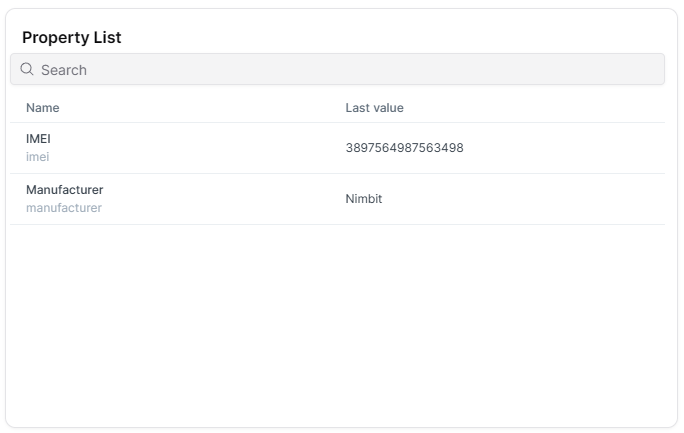
The Property List widget displays all properties of a selected Thing in a table format. Unlike measure-based table widgets, this widget automatically shows all Thing properties without requiring individual property selection, making it ideal for comprehensive device information displays.
Use Cases
- Complete Device Overview - Display all properties of a Thing in one widget
- Asset Information Panel - Present comprehensive device metadata
- Thing Type Dashboards - Automatically display properties for any Thing of a type
- Device Documentation - Create complete property reference views
Key Features
- Automatic display of all Thing properties
- No manual property selection needed
- Tabular organization with property names and values
- Works with Thing properties, not measures
- Supports Thing Type dashboards (shows properties for current Thing)
- Compact table format
Configuration
Basic Settings
| Field | Required | Description |
|---|---|---|
| Thing | ✅ Yes* | Select the Thing to display all properties from |
Note: On Thing Type dashboards, Thing selection is automatic and not required in the configuration form.
Best Practices
- Thing Type Dashboards - Ideal for Thing Type dashboards where it automatically adapts to any Thing
- Complete Property View - Best used when you want to show all properties without filtering
- Widget Size - Size widget appropriately to accommodate all properties with scrolling if needed
- Complementary Usage - Combine with Property widget when you need both complete overview and specific property highlights
- Property Count - Works well for Things with any number of properties (table scrolls as needed)
- Documentation - Excellent for creating device documentation or info panels
What's Next?
- Property - Display a single specific property