File List Widget
Overview
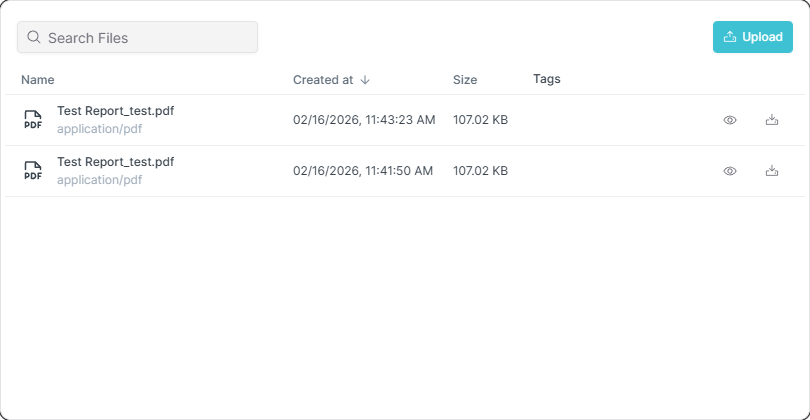
The File List widget displays and manages files associated with Things. It provides easy access to documents, images, manuals, certificates and other files related to your IoT devices, all within the dashboard interface.
Use Cases
- Documentation Access - Quick access to device manuals and guides
- Certificate Management - Display calibration and compliance certificates
- Image Gallery - Show device photos or inspection images
- Report Storage - Access maintenance and inspection reports
- File Repository - Centralized file management for devices
Key Features
- File listing with details
- File upload and download
- File preview capabilities
- File type filtering
- Search and sort functionality
- Delete and manage files
Configuration
Basic Settings
| Field | Required | Description |
|---|---|---|
| Files | ❌ No | Select specific files to display |
| Search Labels | ❌ No | Filter files by tags (comma-separated) |
| Allow Upload | ❌ No | Enable file upload functionality (default: true) |
File Selection
You can populate the File List widget in two ways:
- Specific Files - Manually select individual files to display
- Search Labels - Use tags to dynamically filter files based on their labels
Note: At least one of Files, Search Labels, or Allow Upload must be configured.
Display Options
| Field | Required | Description |
|---|---|---|
| Border color | ❌ No | Custom border color |
Schema Details
Widget Type: fileList
Config Properties:
file(required) - File ID to displayimported(required) - Boolean indicating if file was imported
Optional Properties:
searchLabels- Comma-separated string of label names for filtering filesallowUpload- Boolean to enable/disable file upload (default:false)bgColor- Background colorborderColor- Border color
File Management
- Files must be customer-managed (not system files)
- Only non-folder files are displayed
- Files can be added/removed from the widget
- Upload functionality can be enabled to allow users to add new files directly from the widget
- Search labels automatically filter files tagged with specified labels
Best Practices
- File Organization - Use clear naming conventions for files
- Regular Cleanup - Remove outdated files periodically
- Access Control - Ensure proper group permissions for sensitive files
- File Types - Support common formats for easy access
- Widget Size - Size appropriately for expected file count
What's Next?
- Image Widget - For displaying single images
- iFrame Widget - For embedded documents