Getting Started with IoTBreeze
Welcome to IoTBreeze. This guide covers the essential concepts and first setup steps so you can move quickly from connected assets to actionable insights. The goal is simple: generate real added value from your operational data.
If you do not have an account yet, contact us at info@nimbit.de and we will provide access to the platform.
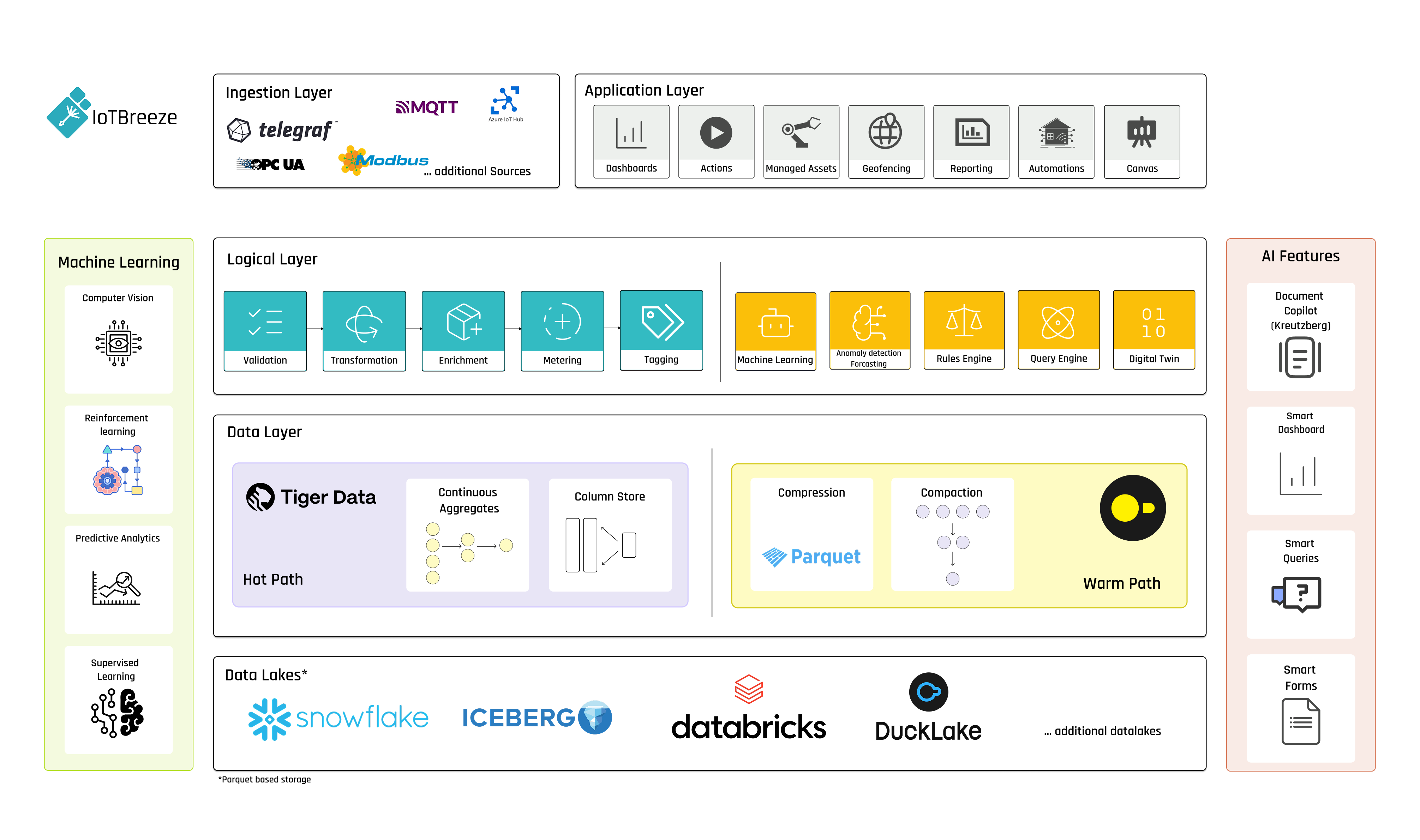
IoTBreeze Solution Modules
IoTBreeze combines platform and automation capabilities that can be adapted to your business context:
- IoTBreeze Core: Connect data sources, standardize device information and create a reliable foundation for dashboards and operations.
- Rules Engine: Trigger event-driven actions, notifications and backend workflows in real time.
- AI Features: Detect anomalies, optimize maintenance cycles and support predictive manufacturing decisions.
Core Concepts
Before diving into the platform, let's understand the key concepts that form the foundation of IoTBreeze:
ThingTypes: The Blueprint for Your Devices
ThingTypes are templates or models that define the structure and capabilities of a class of devices. Think of a ThingType as a blueprint that specifies:
-
Properties: Metadata or business data related to the device (manufacturer, model number, firmware version, owner, etc.)
-
Measures: The data points your device collects and reports over time (temperature, humidity, power consumption, battery levels, etc.)
-
Actions: Commands that can be executed on the device to control its behavior (turn on/off, reset, update firmware, change settings, etc.)
-
ETL Rules: Extract, Transform, Load pipelines for processing incoming data in real-time (unit conversion, calculating derived values, filtering, aggregation, etc.)
Real-world example: A "Smart Thermostat" ThingType might define properties like model number and installation date, measures like current temperature and humidity, actions like "set temperature" and "change mode" and ETL rules to convert temperature units and calculate comfort indices.
Things: Your Digital Devices
Things are the actual instances of devices created from a ThingType. When you add a physical device to the system, you create a Thing based on the appropriate ThingType. Each Thing:
- Inherits the structure defined by its ThingType, ensuring consistency across similar devices
- Has unique identification and authentication credentials for secure communication
- Maintains its own state and history, allowing for individual device tracking and analysis
- Can be individually monitored and controlled, even while sharing a common structure with other devices
- Stores device-specific values for all properties and measures defined in the ThingType
- Supports tagging and grouping for easier management of large device fleets
- Can have custom alerts and thresholds configured for its specific deployment context
Real-world example: "Living Room Thermostat" would be a Thing created from the "Smart Thermostat" ThingType. It would have specific values for its location, installation date, current temperature readings and other attributes defined by the ThingType.
Dashboards: Visualize and Control
Dashboards are customizable interfaces that allow you to:
- Monitor real-time and historical device data with auto-refreshing widgets
- Visualize trends and patterns through various chart types and data representations
- Control devices through an intuitive interface with action buttons and forms
- Organize information for different use cases or user roles
- Set up alerts and notifications based on threshold conditions
- Compare data across multiple devices or time periods
- Create public or private views for different stakeholders
- Embed dashboards in other applications or websites
Each dashboard consists of widgets that can display:
- Real-time data values
- Historical trend charts
- Geographical maps for location tracking
- State indicators and status displays
- Control interfaces for executing actions
- Comparison views between multiple devices
- Aggregated statistics across device groups
- Custom calculated metrics
First Steps
The first steps in getting started with your system are onboarding your devices and sending data. IoTBreeze uses the concepts of Thing Types and Things for managing devices.
This approach of separating the device definition (ThingType) from device instances (Things) provides several advantages:
- Consistent data structure across all devices of the same type
- Predictable properties with predefined datatypes which makes using that data in subsequent processes much more reliable
- Simplified dashboard creation that can be applied to any device of the same type
- Streamlined device provisioning for large deployments
- Centralized schema updates that can be applied to all devices simultaneously
- Improved data validation based on expected values and formats
- Easier integration with other systems through consistent data structures
Things are individual instances of devices based off of a ThingType. This allows us to create dashboards and processes based off of a specific ThingType and make them applicable to all devices (Things) of that particular type, while still maintaining individual device history and configurations.
Device Onboarding
IoTBreeze provides various flexible ways to onboard devices depending on your technical requirements and operational preferences.
Device Registration Through the UI
The most straightforward approach for getting started is to use the web interface to:
Create Thing Types Register ThingsThis method provides a guided experience with form validation and instant feedback, making it ideal for:
- Initial system setup
- Small to medium deployments
- Testing and prototyping
- Teams with varying technical expertise
Plug-and-Play via Message
For rapid deployment or situations where device specifications may not be fully known in advance, IoTBreeze offers a plug-and-play capability:
- Devices can be onboarded automatically by sending data without having pre-defined ThingTypes and Things
- Fields and datatypes are auto-detected based on the payload sent by the device
- The system generates appropriate ThingTypes and Things based on the incoming data structure
- As devices evolve and send new data fields, IoTBreeze will automatically update the schema to accommodate these changes
This approach is particularly useful for:
- Rapid prototyping
- Exploratory IoT projects
- Devices with evolving capabilities
- Heterogeneous device fleets with varying data structures
- Situations where you want to "collect first, structure later"
API Integration
For advanced users and system integrators, IoTBreeze provides comprehensive API access for programmatic device registration:
- Create and manage ThingTypes programmatically
- Register Things in bulk for large-scale deployments
- Integrate device provisioning with existing manufacturing or deployment workflows
- Automate the onboarding process as part of a larger system
- Update device configurations systematically
The API approach is ideal for:
- Large-scale industrial deployments
- OEMs integrating IoTBreeze into their products
- System integrators building complete IoT solutions
- Organizations with mature DevOps practices
- Scenarios requiring automated device lifecycle management
Next Steps After Onboarding
Once your devices are onboarded and sending data, you can:
- Create custom dashboards to visualize your device data
- Set up alerts for critical conditions or thresholds
- Configure automation pipelines to respond to device events
- Establish ETL processes for data transformation and enrichment
- Set up geofencing for location-aware applications
- Generate reports for stakeholders and analysis
- Integrate with external systems through APIs
- Configure user access and permissions for team members
For more detailed guidance on these next steps, explore the relevant sections in our documentation.