Events Widget
Overview
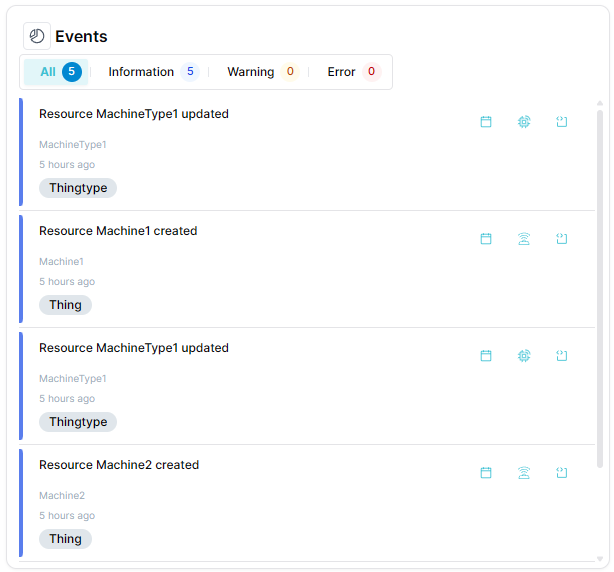
The Events widget displays and manages events from your Things with timestamps and details. It provides a centralized view of system events, alerts, state changes and other significant occurrences for monitoring and troubleshooting.
Use Cases
- Event Monitoring - Track system events in real-time
- Alert Management - View and manage active alerts
- Audit Trail - Review historical event logs
- Troubleshooting - Investigate issues through event history
- State Changes - Monitor when device states change
Key Features
- Chronological event listing
- Event filtering and searching
- Event type categorization
- Timestamp display
- Event details and descriptions
- Export capabilities
Configuration
Basic Settings
| Field | Required | Description |
|---|---|---|
| Name | ❌ No | Display name for the widget |
| Event Types | ✅ Yes | Filter specific event types to show |
Display Options
| Field | Required | Description |
|---|---|---|
| Transparent Background | ❌ No | Remove widget background |
| Background Color | ❌ No | Custom background color |
| Border color | ❌ No | Custom border color |
Schema Details
Widget Type: events
Config Properties:
id(required) - Widget configuration identifiereventTypes(required) - Array of event type IDs to display
Optional Properties:
name- Widget display nametransparent- Enable transparent backgroundbgColor- Background colorborderColor- Border color
Event Type Filtering
The widget automatically filters system events based on dashboard type:
- General Dashboards - Shows all event types including system events
- Thing/ThingType Dashboards - Excludes system-initiated events (
initiator!=SYSTEM)
Best Practices
- Event Filtering - Filter to relevant event types
- Timeframes - Use appropriate time ranges
- Regular Review - Review events regularly for patterns
- Alert Response - Establish procedures for critical events
- Event Archiving - Archive old events for performance
What's Next?
- Timeline Widget - For chronological visualization
- Action Widget - For executing actions